Mark the exact area
Use the brush to identify the object or distraction that should change.
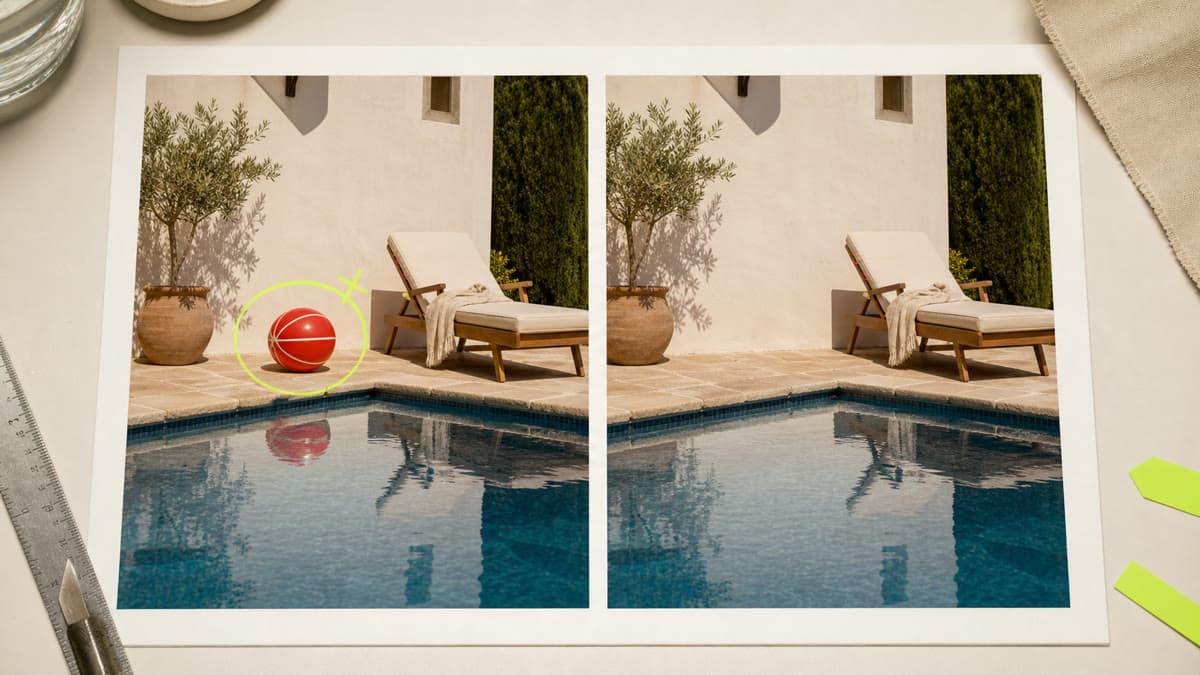
Paint a mask over the unwanted area and tell Brava what belongs behind it. The edit creates a separate private result.
Use the brush to identify the object or distraction that should change.
State what should replace the masked area while the rest of the image remains recognizable.
The completed edit is stored as a new private PNG and does not overwrite the original.
Select a compatible private image or upload a new one.
Mask the unwanted area and write a concise description of the intended background.
Create the edited PNG, inspect the rebuilt area and continue from the new asset.
Paint over the unwanted area with the built-in mask brush before submitting the edit.
The edit prompt asks the model to rebuild the masked area while preserving the unmasked scene, though generated edits should always be reviewed.
No. The edited PNG is saved as a separate private asset.
Mask the distraction, direct the repair and keep the original beside the edited result.
Remove an object